### [Platform Data Sources](reference/recommended.md)
- [Recommended](reference/recommended.md) GET
- [Top Sellers](reference/top-sellers.md) GET
- [Trending Products](reference/trending-products.md) GET
- [View More...](reference/recommended.md){.view-more}
### [Data Sources : Widgets](reference/api-custom-endpoints.md)
- [Custom Endpoints](reference/api-custom-endpoints.md) GET
- [All Sources](reference/sources.md)
- [Widget Settings](reference/widget-settings-url.md) GET
### [Rebuy Analytics](reference/analytics-event.md)
- [Event](reference/analytics-event.md) POST
- [Rebuy Analytic 2.0 Endpoints](reference/rebuy-analytic-v2-endpoints.md)
### [JavaScript](reference/rebuy-js-overview.md)
- [Overview](reference/rebuy-js-overview.md)
- [Cart](reference/cart.md)
- [Smart Cart](reference/smart-cart.md)
- [View More...](reference/rebuy-js-overview.md){.view-more}
### [Smart Cart](reference/smart-cart.md)
- [Overview](reference/smart-cart.md)
- [Settings](reference/smart-cart-settings.md)
- [Methods - Legacy](reference/smart-cart-methods-legacy.md)
- [View More...](reference/smart-cart.md){.view-more}
### [Smart Flows](reference/smart-flows-methods.md)
- [Methods](reference/smart-flows-methods.md)
- [Session](reference/smart-flows-methods-session.md)
### [Headless SDKs](reference/headless-sdk-overview.md)
- [Overview](reference/headless-sdk-overview.md)
- [@rebuy/core-sdk](reference/core-sdk-getting-started.md)
- [@rebuy/hydrogen-sdk](reference/hydrogen-sdk-getting-started.md)
### [Experiments JS](reference/experiments-overview.md)
- [Overview](reference/experiments-overview.md)
- [Methods](reference/experiments-methods.md)
- [Examples](reference/experiments-examples.md)
### [Storefront Helper](reference/shopifystorefront-helper-overview.md)
- [Overview](reference/shopifystorefront-helper-overview.md)
- [Methods](reference/shopifystorefront-helper-methods.md)
- [Examples](reference/shopifystorefront-helper-examples.md)
### [Shopify Permalinks](reference/shopify-permalinks-introduction.md)
- [Overview](reference/shopify-permalinks-introduction.md)
- [Methods](reference/shopify-permalinks-methods.md)
- [Examples](reference/shopify-permalinks-examples.md)
### [Rebuy + Hydrogen 1.0](reference/shopify-hydrogen.md)
- [Overview](reference/shopify-hydrogen.md)
- [Getting Started](reference/shopify-hydrogen-getting-started.md)
- [Installation](reference/shopify-hydrogen-installation.md)
- [View More...](reference/shopify-hydrogen.md){.view-more}
### [Meta Shops](reference/meta-shops-recommended.md)
- [Recommended](reference/meta-shops-recommended.md) POST
- [Storefront Trending](reference/meta-storefront-trending.md) POST
- [Collection Trending](reference/meta-collection-trending.md) POST
### [Rebuy + Tapcart](reference/tapcart-custom-screen.md)
- [Tapcart Custom Screen](reference/tapcart-custom-screen.md)
### [Rebuy Smart Search](reference/smart-search.md)
- [Search](reference/smart-search.md) POST
- [QuickView Search](reference/quickview-search.md) POST
### [Rebuy Smart Collections](reference/smart-collections-active-setting.md)
- [Active Settings](reference/smart-collections-active-setting.md) GET
- [Product List](reference/smart-collections-product-list.md) POST
---
## Getting Started
To access the REST API and all the power it offers, get started by creating a development store.
To use our demo store, use this key:
```text
0f46a05ff487a8a8856148bc6d436efd47e46abe
```
!!! note "Demo Key Limitations"
Some endpoints require specific parameters (relating to a storefront, customer, etc.) that will only be accessible with your own Rebuy account and development store.
## Need Help?
- **Support**: Open a chat with us using the Intercom widget in the bottom-right corner. See [Contacting Rebuy Support](https://help.rebuyengine.com/en/articles/7914694-contacting-rebuy-support) for all support options.
- **Status**: Check [status.rebuyengine.com](https://status.rebuyengine.com)
---
# Getting Started with Rebuy (2.5KB)
Source: https://developers.rebuyengine.com/guides/getting-started.md
## Welcome to the Rebuy Engine Developer Hub
In this developer portal, you will find helpful documentation covering the **REST API**, the **JavaScript Guide**, and more.
### Getting Started
To access the REST API and all the power it offers you, please get started by creating a development store.
To use our demo store, please use this key:
```text
0f46a05ff487a8a8856148bc6d436efd47e46abe
```
!!! note "Demo Key Limitations"
Some endpoints will require specific parameters (relating to a storefront, customer, etc.) that will only be accessible with your own Rebuy account and development store.
#### Quick Example
Try fetching product recommendations with curl:
```bash
curl "https://rebuyengine.com/api/v1/products/recommended?key=0f46a05ff487a8a8856148bc6d436efd47e46abe&limit=2"
```
Or with JavaScript:
```javascript
const API_KEY = '0f46a05ff487a8a8856148bc6d436efd47e46abe';
fetch(`https://rebuyengine.com/api/v1/products/recommended?key=${API_KEY}&limit=2`)
.then(response => response.json())
.then(data => {
console.log('Recommended products:', data.data);
});
```
The REST API offers a number of endpoints, and we'd like to highlight the Platform endpoints vs. our Custom endpoints.
### Platform Endpoints
Platform endpoints include all of Rebuy's standard endpoints that return products. These will cover many use cases for your storefront or application.
[See the Platform Endpoint docs here.](../reference/recommended.md)
### Custom Endpoints
Custom Endpoints, also known as Data Sources, or sometimes Rulesets are one of Rebuy's most powerful features.
[See the Custom Endpoints docs here.](../reference/api-custom-endpoints.md)
### Rebuy Connector
The Rebuy Connector is a Shopify App Embed that enables advanced features like optimized script loading and customer tag targeting. If you're using Smart Flows or want faster load times, you'll want to enable it.
[Learn about the Rebuy Connector](rebuy-connector.md)
#### More Reading
* [How to configure and apply Custom Endpoints](https://help.rebuyengine.com/en/articles/6117555-how-to-configure-and-apply-endpoints)
* [Read more on Data Sources](https://help.rebuyengine.com/en/collections/3401117-data-sources)
* [Read more on Widgets](https://help.rebuyengine.com/en/?q=widgets)
---
# Rebuy Connector (4.8KB)
Source: https://developers.rebuyengine.com/guides/rebuy-connector.md
# Rebuy Connector
The Rebuy Connector is a Shopify App Embed that enables advanced Rebuy features by outputting Liquid directly within your theme. It serves as the bridge between Shopify's server-side capabilities and Rebuy's client-side functionality.
## Overview
The Rebuy Connector is a Global App Embed block that must be enabled in your Shopify theme settings. Once enabled, it provides access to features that require server-side Liquid rendering, such as optimized script loading and real-time customer data.
## Enabling the Rebuy Connector
1. In your Shopify admin, navigate to **Online Store > Themes**
2. Click **Customize** on your active theme
3. In the theme editor, click **App embeds** in the left sidebar
4. Toggle **Rebuy Connector** to enabled
5. Click **Save**
Alternatively, you can access the App Embeds directly via:
`https://[your-store].myshopify.com/admin/themes/current/editor?context=apps`
!!! warning "Per-Theme Setting"
The Rebuy Connector must be enabled on **each theme** where you want Rebuy features to work. If you have multiple themes (e.g., a staging theme), remember to enable the Connector on each one.
## Features
### Script Tag Installation
The Rebuy Connector enables optimized script loading by injecting the Rebuy script tag directly into your theme via Liquid. This allows Rebuy to load earlier in the page lifecycle, reducing delays for features like Smart Cart, Widgets, and Smart Search.
When enabled in combination with the "Install Rebuy Script Tag and Disable Rebuy JS" setting in Rebuy Admin, the Connector outputs:
```liquid
```
**To configure:**
1. Ensure the Rebuy Connector is enabled in your theme's App Embeds
2. In Rebuy Admin, navigate to **Settings > App Settings**
3. Enable **Install Rebuy Script Tag and Disable Rebuy JS**
!!! danger "Important"
Do not disable Rebuy JS in the admin before confirming the Rebuy Connector is active on your theme, or Rebuy features will not load.
For more details on optimizing load times, see the [Load Rebuy Faster](https://help.rebuyengine.com/en/articles/6656777-load-rebuy-faster) help article.
### Customer Tags
The Rebuy Connector can expose Shopify customer tags to Rebuy, enabling real-time personalization in Smart Flows based on customer segmentation.
When enabled, the Connector makes the logged-in customer's tags available to Rebuy's client-side library, allowing you to create targeted experiences using Smart Flows conditions.
**To configure:**
1. Ensure the Rebuy Connector is enabled in your theme's App Embeds
2. In Rebuy Admin, navigate to **Settings > App Settings**
3. Enable **Expose Customer Tags**
Once enabled, you can use customer tags as conditions in Smart Flows to target specific customer segments.
#### Use Cases
- Show VIP-exclusive offers to customers tagged as "VIP"
- Display loyalty rewards to customers tagged with membership tiers
- Target wholesale customers with B2B-specific messaging
- Personalize upsells based on customer purchase history tags
## Technical Details
The Rebuy Connector works by rendering a small Liquid snippet within the `` or `` of your theme (depending on configuration). This snippet:
- Reads from Rebuy app metafields to determine which features are enabled
- Outputs the appropriate Liquid/JavaScript based on your settings
- Makes server-side Shopify data (like customer tags) available to client-side Rebuy features
Because the Connector uses Shopify's native App Embed system, it automatically loads on all pages where app embeds are supported and requires no manual theme code modifications.
## Troubleshooting
**Rebuy features not loading after enabling Script Tag installation:**
: Verify the Rebuy Connector is toggled on in your theme's App Embeds. The setting in Rebuy Admin only works when the Connector is active.
**Customer tags not appearing in Smart Flows:**
: Ensure the customer is logged in. Customer tags are only available for authenticated customers. Also verify the "Expose Customer Tags" setting is enabled in Rebuy Admin.
**Connector not visible in App Embeds:**
: Try refreshing the page or re-opening the theme editor. If the issue persists, reinstall the Rebuy app or contact support.
## Related Resources
- [Load Rebuy Faster](https://help.rebuyengine.com/en/articles/6656777-load-rebuy-faster) - Detailed guide on optimizing Rebuy load times
- [Manual Installation](../reference/manual-installation.md) - Alternative method for adding Rebuy script to your theme
- [Smart Flows Methods](../reference/smart-flows-methods.md) - JavaScript methods for Smart Flows
---
# AI Integration Guide (6.6KB)
Source: https://developers.rebuyengine.com/guides/ai-integration.md
## AI-Friendly Documentation
Rebuy provides machine-readable documentation indexes designed for AI assistants and LLM-powered development tools.
### llms.txt Files
| File | Size | URL | Purpose |
|------|------|-----|---------|
| **Index** | {{LLMS_TXT_SIZE}} | [llms.txt](https://developers.rebuyengine.com/llms.txt) | Compact index with page descriptions |
| **Full Content** | {{LLMS_FULL_SIZE}} | [llms-full.txt](https://developers.rebuyengine.com/llms-full.txt) | Complete documentation dump |
Use the index for quick lookups. Use full content when you need deep context.
## On-Page AI Menu
Every documentation page includes an **Ask AI** dropdown below the title with these options:
| Option | Action |
|--------|--------|
| **Ask Claude** | Opens Claude.ai with the page pre-loaded for Q&A |
| **Ask ChatGPT** | Opens ChatGPT with the page pre-loaded for Q&A |
| **Copy MD** | Copies the page's raw markdown to your clipboard |
| **View MD** | Opens the raw markdown file in a new tab |
The **View MD** option is useful when you want to share a direct link to the markdown source, or when using tools that prefer raw markdown URLs.
## Using with AI Tools
### Claude Code
**Option 1:** Fetch llms.txt for context:
```bash
curl -s https://developers.rebuyengine.com/llms.txt
```
**Option 2:** Install the skill for guided workflows:
```bash
mkdir -p .claude/skills/building-rebuy-features
curl -o .claude/skills/building-rebuy-features/SKILL.md \
https://developers.rebuyengine.com/assets/skills/building-rebuy-features.md
```
### ChatGPT / Other LLMs
Start your conversation with:
> Read https://developers.rebuyengine.com/llms.txt and use it as context for my questions.
Then ask your Rebuy integration question.
### Claude.ai Projects
1. Create a new project
2. Add `https://developers.rebuyengine.com/llms.txt` as a web source
3. Or upload the skill file as a project knowledge file
## Claude Code Skill
The skill provides guided workflows for building Rebuy integrations. [Download the skill directly](https://developers.rebuyengine.com/assets/skills/building-rebuy-features.md) or copy the content below to `.claude/skills/building-rebuy-features/SKILL.md`:
```markdown
---
name: building-rebuy-features
description: >-
Builds custom Rebuy integrations including widget templates, event listeners,
REST API calls, Smart Cart apps, and headless/Hydrogen setups. Use when
customizing Rebuy widgets, listening to cart events, calling the Rebuy API,
or integrating with Shopify Hydrogen.
---
## Quick Start
1. **Fetch the documentation index:**
```
https://developers.rebuyengine.com/llms.txt
```
2. **For complete context:**
```
https://developers.rebuyengine.com/llms-full.txt
```
3. **Identify the feature type** below and find relevant docs in the index.
> **Note:** Documentation filenames below (e.g., `widget-custom-templates.md`) correspond to entries in llms.txt. Fetch the index to get full URLs.
## Feature Types
### Custom Widget Templates
Customize HTML/Vue.js templates for product recommendation widgets.
**Docs:** `widget-custom-templates.md`, `bundle-builder-custom-template.md`, `modal-custom-templates.md`
**Pattern:**
```html
```
**Available data:** `products`, `settings`, `addToCart(product)`, `formatMoney(cents)`
### Smart Cart Customization
Customize the slide-out cart drawer.
**Docs:** `smart-cart.md`, `smart-cart-custom-template.md`, `smart-cart-methods.md`, `smart-cart-event-listeners.md`
**Note:** V2 Smart Cart templates are managed in the Rebuy admin UI, not code.
### Event Listeners
React to Rebuy lifecycle events for custom integrations.
**Docs:** `event-listeners.md`, `cart-event-listeners.md`, `smart-cart-event-listeners.md`, `widget-event-listeners.md`
**Pattern:**
```javascript
document.addEventListener('rebuy:cart.add', function(event) {
const { cart, item } = event.detail;
// Your custom logic
});
```
**Common events:** `rebuy:cart.ready`, `rebuy:cart.add`, `rebuy:smartcart.show`, `rebuy:widget.ready`
### API Integrations
Call Rebuy REST APIs for headless or server-side integrations.
**Docs:** `recommended.md`, `top-sellers.md`, `trending-products.md`, `api-custom-endpoints.md`
**Base URL:** `https://rebuyengine.com/api/v1/`
```bash
curl -H "x-rebuy-api-key: YOUR_API_KEY" \
"https://rebuyengine.com/api/v1/products/recommended?shopify_product_ids=123"
```
### Smart Cart Apps
Build custom apps that appear inside Smart Cart.
**Docs:** `building-your-smartcart-app.md`, `smart-cart-methods-smart-cart-apps.md`
### Headless / Hydrogen
Integrate Rebuy in headless Shopify stores.
**Docs:** `headless-sdk-overview.md`, `core-sdk-getting-started.md`, `hydrogen-sdk-getting-started.md`
**NPM Packages:** `@rebuy/core-sdk`, `@rebuy/hydrogen-sdk`
## Public JavaScript API
The `window.Rebuy` object exposes:
| Module | Purpose |
|--------|---------|
| `Rebuy.Cart` | Cart operations |
| `Rebuy.SmartCart` | Smart Cart control |
| `Rebuy.Widgets` | Widget management |
| `Rebuy.SmartSearch` | Search functionality |
| `Rebuy.SmartCollections` | Collection pages |
| `Rebuy.util` | Helper functions |
## Common Patterns
```javascript
// Listen for cart updates
document.addEventListener('rebuy:cart.change', (e) => {
console.log('Cart updated:', e.detail.cart);
});
// Add to cart programmatically
Rebuy.Cart.addItem({ id: variantId, quantity: 1 });
// Wait for Rebuy to initialize
document.addEventListener('rebuy:ready', () => {
console.log(Rebuy.Cart.getCart());
});
// Show/hide Smart Cart
Rebuy.SmartCart.show();
Rebuy.SmartCart.hide();
```
## Resources
- **Full Docs:** https://developers.rebuyengine.com
- **llms.txt:** https://developers.rebuyengine.com/llms.txt
- **Full Context:** https://developers.rebuyengine.com/llms-full.txt
```
## What's in llms.txt?
The index includes entries for every documentation page:
- **API Reference** - REST endpoints for recommendations, analytics, search
- **JavaScript API** - Cart, Smart Cart, Widgets, Events, Utilities
- **Headless SDKs** - Core SDK and Hydrogen integration
- **Custom Templates** - Widget, Smart Cart, Modal templates
- **Event Listeners** - All Rebuy lifecycle events
Each entry includes the page URL and a brief description to help AI tools find the right documentation quickly.
---
# Building Your Smart Cart App (2.6KB)
Source: https://developers.rebuyengine.com/guides/building-your-smartcart-app.md
## Create The App
To create a Smart Cart App start by creating your Rebuy Partners account [here](https://rebuyengine.com/partners/create). If you have already created one then [login](https://rebuyengine.com/partners/login).
Once you are logged in, click on **Smart Cart Apps** in the left sidebar menu. Then, click **Create New App**.
You will then see the following form:
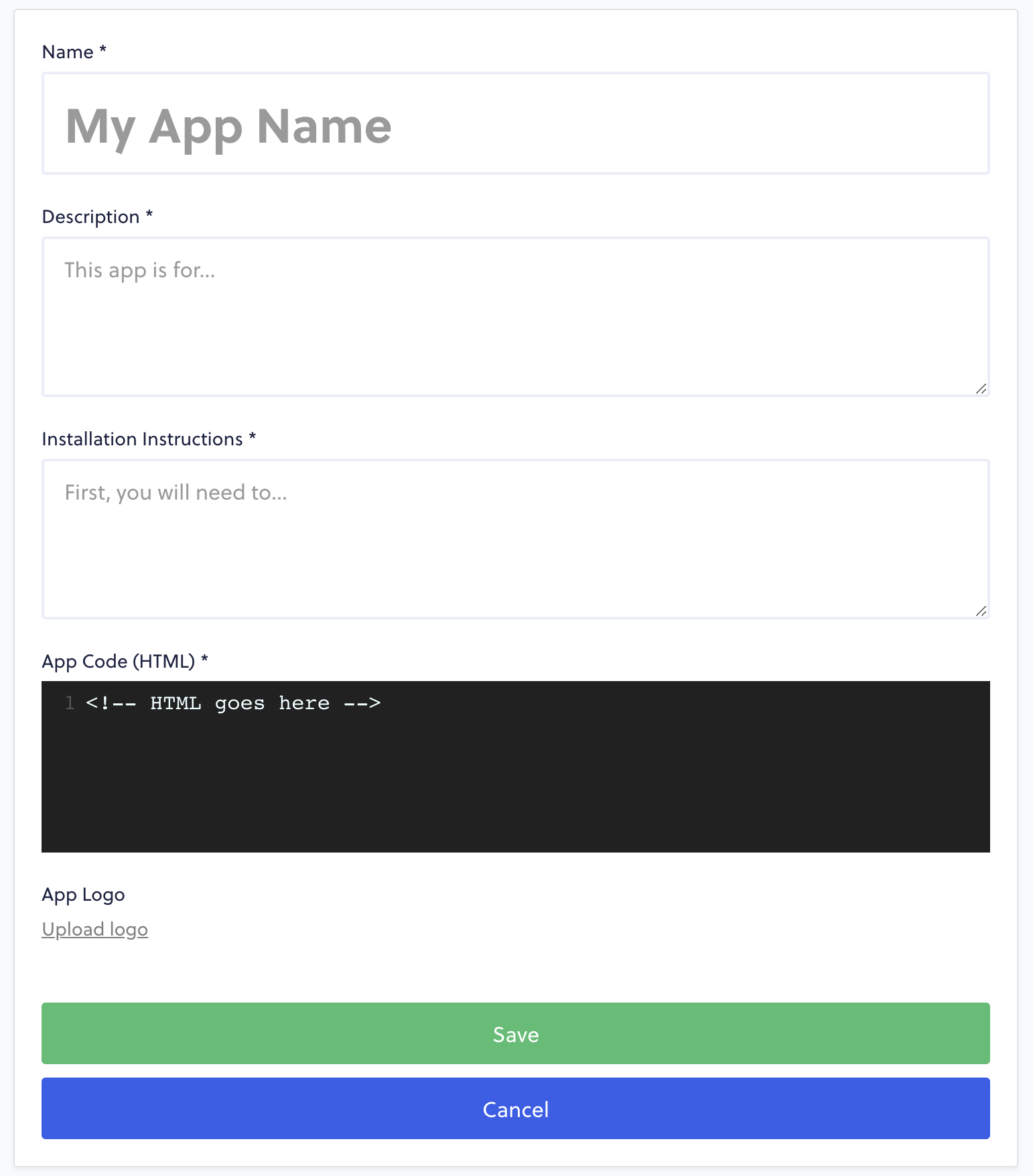
Start by giving your app a **Name**, **Description**, and **Installation Instructions**. If there are no extra steps to install your app (ie. registering an account on your website), then you can use "N/A" or "None" in the instructions field.
The **App Code** section is where you will place your HTML, JavaScript, or even CSS for your app. Just keep in mind that this field expects HTML, so if you're planning on writing CSS and JS inside of this editor, you'll need to wrap it in `